

 Flux.1 Krea Dev is an advanced text-to-image generation model developed in collaboration between Black Forest Labs (BFL) and Krea. This is currently the best open-source FLUX model, specifically designed for text-to-image generation.
Model Features
Flux.1 Krea Dev is an advanced text-to-image generation model developed in collaboration between Black Forest Labs (BFL) and Krea. This is currently the best open-source FLUX model, specifically designed for text-to-image generation.
Model Features
- Unique Aesthetic Style: Focuses on generating images with unique aesthetics, avoiding common “AI look” appearance
- Natural Details: Does not produce blown-out highlights, maintaining natural detail representatio
- Exceptional Realism: Provides outstanding realism and image quality
- Fully Compatible Architecture: Fully compatible architecture design with FLUX.1 [dev]
Flux.1 Krea Dev ComfyUI Workflow
1. Workflow Files
Download the image or JSON below and drag it into ComfyUI to load the corresponding workflow
Download JSON Workflow
2. Manual Model Installation
Please download the following model files: Diffusion modelThe
flux1-dev.safetensors file requires agreeing to the black-forest-labs/FLUX.1-Krea-dev agreement before downloading via browser.- clip_l.safetensors
- t5xxl_fp16.safetensors Recommended when your VRAM is greater than 32GB.
- t5xxl_fp8_e4m3fn.safetensors For Low VRAM
3. Step-by-step Verification to Ensure Workflow Runs Properly
Please refer to the image below to ensure all model files have been loaded correctly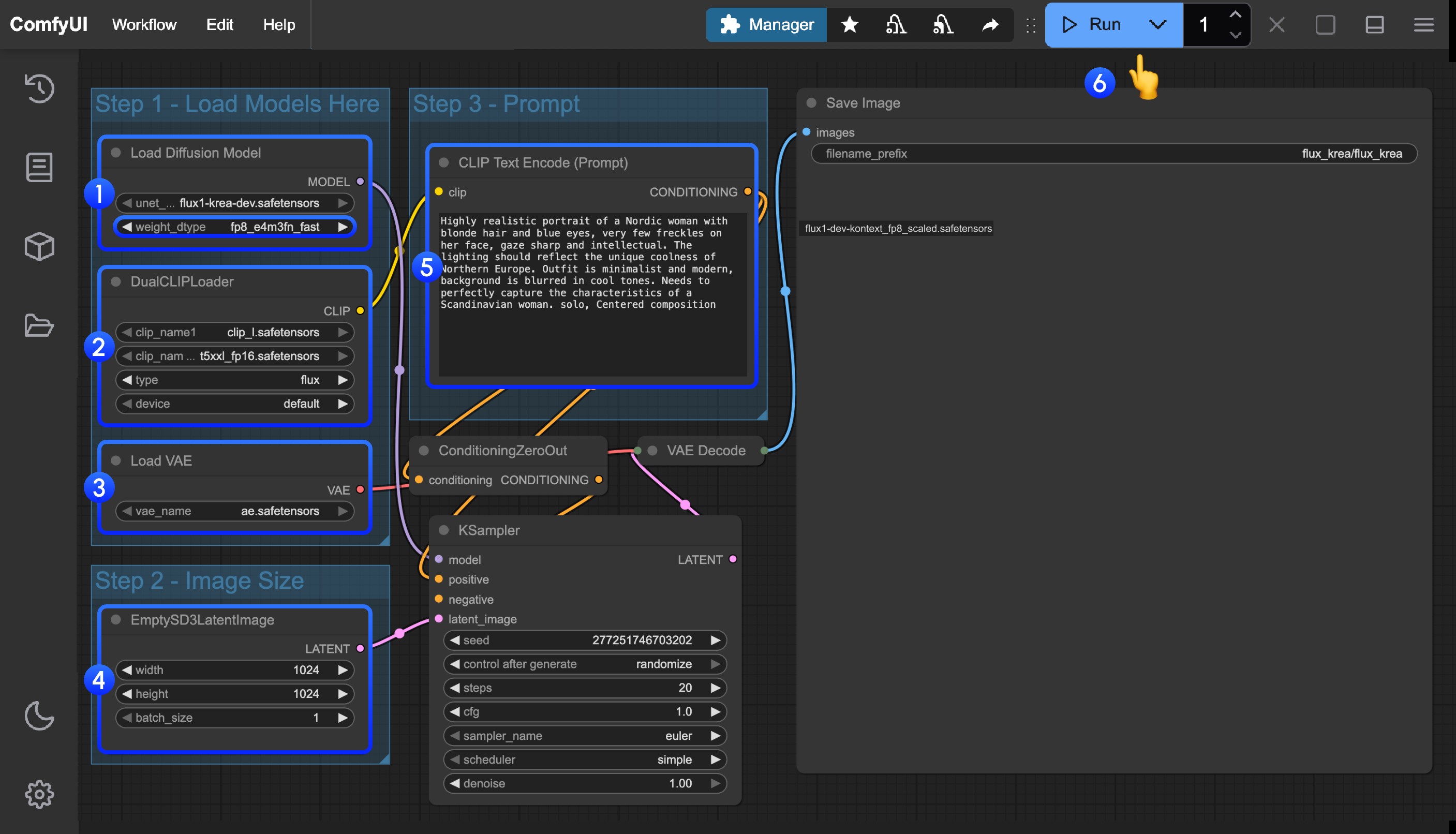
- Ensure that
flux1-krea-dev.safetensorsis loaded in theLoad Diffusion Modelnodeweight_dtypehas been set tofp8_e4m3fn_fastfor low VRAM users- If you have sufficient VRAM like 24GB, you can set
weight_dtypetodefaultfor better quality
- Ensure the following models are loaded in the
DualCLIPLoadernode:- clip_name1: t5xxl_fp16.safetensors or t5xxl_fp8_e4m3fn.safetensors
- clip_name2: clip_l.safetensors
- Ensure that
ae.safetensorsis loaded in theLoad VAEnode - Click the
Queuebutton, or use the shortcutCtrl(cmd) + Enterto run the workflow